7 Best QR Code Scanner Apps for iPhone in 2026
Compare the 7 best QR code scanner apps for iPhone in 2026 by scanning, history, QR creation, privacy, link controls, barcode support, and price.
 QR Reader & Creator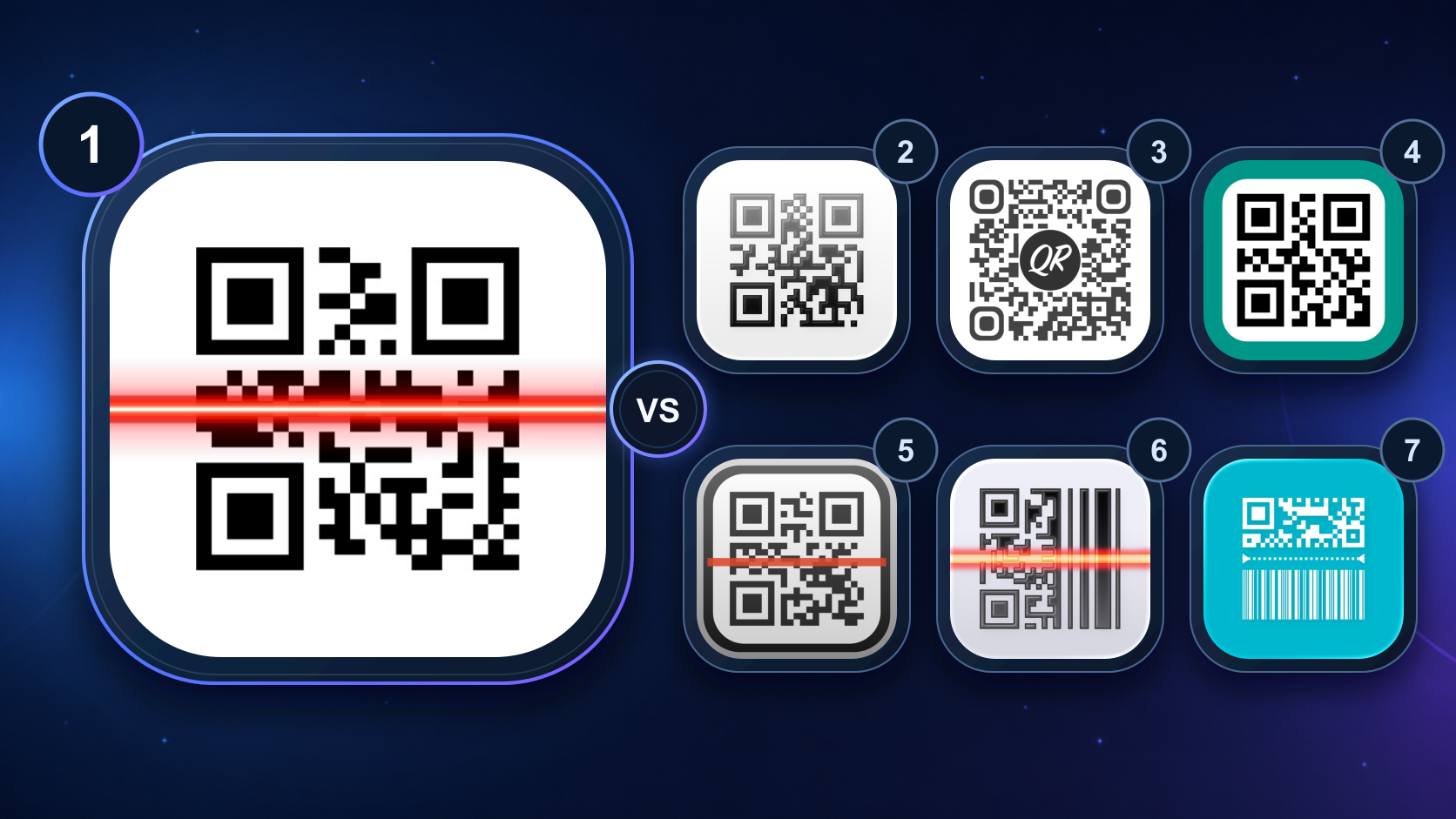
Table of contents+
- Do you need a separate QR scanner app on iPhone?
- The 7 best iPhone QR scanner apps at a glance
- How we ranked these QR code scanner apps
- 1. QR Reader & Creator — best overall QR scanner and creator for iPhone
- 2. QR Pro - QR Code Scanner — best completely free privacy-first app
- 3. Code Reader - QR Scanner — best for link warnings and batch files
- 4. QR Code & Barcode Scanner ・ — best for inventory and CSV history
- 5. QR Code Reader & Code Scanner — best for products and advanced campaigns
- 6. QR Reader for iPhone — best multipurpose scanner
- 7. QRectly — Scan QR & Barcodes — best for GS1 and professional codes
- Which QR scanner should you choose?
- How to scan QR codes more safely
- Frequently asked questions
- Our 2026 recommendation
We rank QR Reader & Creator first for iPhone users who want a focused scanner and generator in one app: broad barcode support, searchable history, result-specific actions, customizable social QR codes, and an uninterrupted Pro scanning mode. QR Pro is the strongest completely free alternative, while the other picks serve more specialized needs such as suspicious-link warnings, CSV export, inventory work, NFC, or GS1 and healthcare codes.
Rich Soft develops the first-ranked app, so this is a first-party editorial comparison, not an independent test lab. We compared published US App Store features, privacy labels, purchase choices, and compatibility. App names, features, prices, ratings, and requirements were checked on August 14, 2026 and can change.
Do you need a separate QR scanner app on iPhone?
For an occasional restaurant menu, ticket, or poster, probably not. Apple documents QR scanning through the iPhone Camera app and the Code Scanner control. Point the camera at the code, wait for the link, and tap it.
A dedicated QR scanner becomes useful when you need something after the first scan:
- A searchable record of previously scanned codes
- QR or barcode recognition from saved images and screenshots
- Product, logistics, ticket, or industrial barcode formats
- Repeated or batch scanning without stopping after every result
- CSV, JSON, PDF, or image export
- QR creation for Wi-Fi, links, contacts, social profiles, or print
- Link previews or warnings before opening an unfamiliar destination
If none of those applies, Camera is the best no-download option. This ranking is for people whose QR codes are part of a repeatable personal or work workflow.
The 7 best iPhone QR scanner apps at a glance
| Rank | App and developer | Best for | Standout capability | App Store model at review |
|---|---|---|---|---|
| 1 | QR Reader & Creator — Rich Soft | Best overall scanner and social QR maker | Searchable history, quick actions, custom QR design, uninterrupted scanning | Free; weekly or $3.99 lifetime Pro |
| 2 | QR Pro - QR Code Scanner — Crypto Inc. | Best completely free privacy-first option | No ads or subscriptions, content preview, optional iCloud sync | Free |
| 3 | Code Reader - QR Scanner — Daniel Illescas Romero | Best for suspicious-link warnings | Pro link checks, batch scans from photos or PDFs, CSV/JSON history | Free; monthly, yearly, or $2.99 lifetime Pro |
| 4 | QR Code & Barcode Scanner ・ — TeaCapps | Best for inventory and history export | Business scanner mode, iCloud history, CSV export, Apple Watch | Free with in-app purchases |
| 5 | QR Code Reader & Code Scanner — ShopSavvy | Best for product lookup and advanced QR campaigns | Price comparison, bulk creation, dynamic QR codes, scan analytics | Free with in-app purchases |
| 6 | QR Reader for iPhone — TapMedia | Best multipurpose scanner | QR, barcode, PDF, business-card, puzzle, database, and NFC tools | Free; subscription and one-time options listed |
| 7 | QRectly — Scan QR & Barcodes — Maciej Bis | Best for GS1, healthcare, and logistics codes | HIBC, GS1, IDs, boarding passes, CSV export, offline operation | Free with in-app purchases |
The ranking is based on use-case fit, not App Store rating count. Some apps have years of reviews while newer specialists do not yet show enough ratings for an overview. Popularity is useful context, but it does not tell you whether an app supports the code format or workflow you need.
How we ranked these QR code scanner apps
We used six decision factors that matter beyond a successful scan:
- Everyday scanning: QR and common barcode support, saved-image input, and useful result actions
- History and repeat work: search, filters, export, auto-save, or batch scanning
- QR creation: supported content types, visual customization, and print or share formats
- Link control: whether the listing publishes a preview, approval step, or suspicious-link warning
- Privacy: the current developer-reported App Privacy label and whether local processing is described
- Value and compatibility: free capability, paid model, supported Apple devices, and minimum iOS
We did not treat a “secure scanner” marketing phrase as proof that every destination is safe. Decoding a QR code and evaluating the website behind it are different jobs.
1. QR Reader & Creator — best overall QR scanner and creator for iPhone
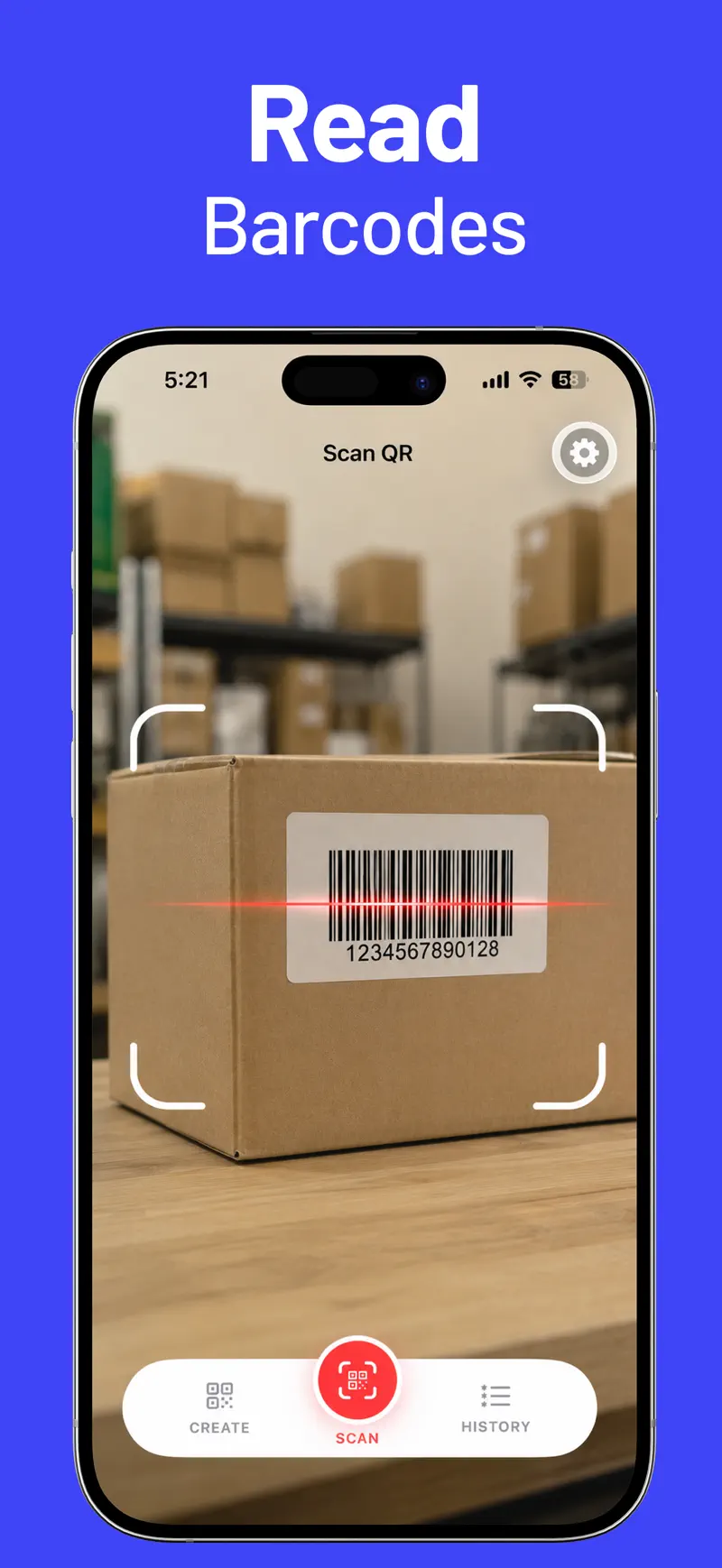
QR Reader & Creator earns our top position by keeping the main workflow focused: scan a code, take the right action, find it later, or create a code of your own. The scanner supports QR Code, Data Matrix, Aztec, PDF417, EAN, UPC-E, Code 39, Code 93, Code 128, ITF-14, and Interleaved 2 of 5.
After a scan, the app can open a link, start a call or message, open a location in Maps, copy, share, or search the result. History can be saved, searched, filtered, reopened, copied, shared, or deleted. Pro scanner settings add auto-save, auto-close, and uninterrupted scanning for someone moving through several codes in one session.
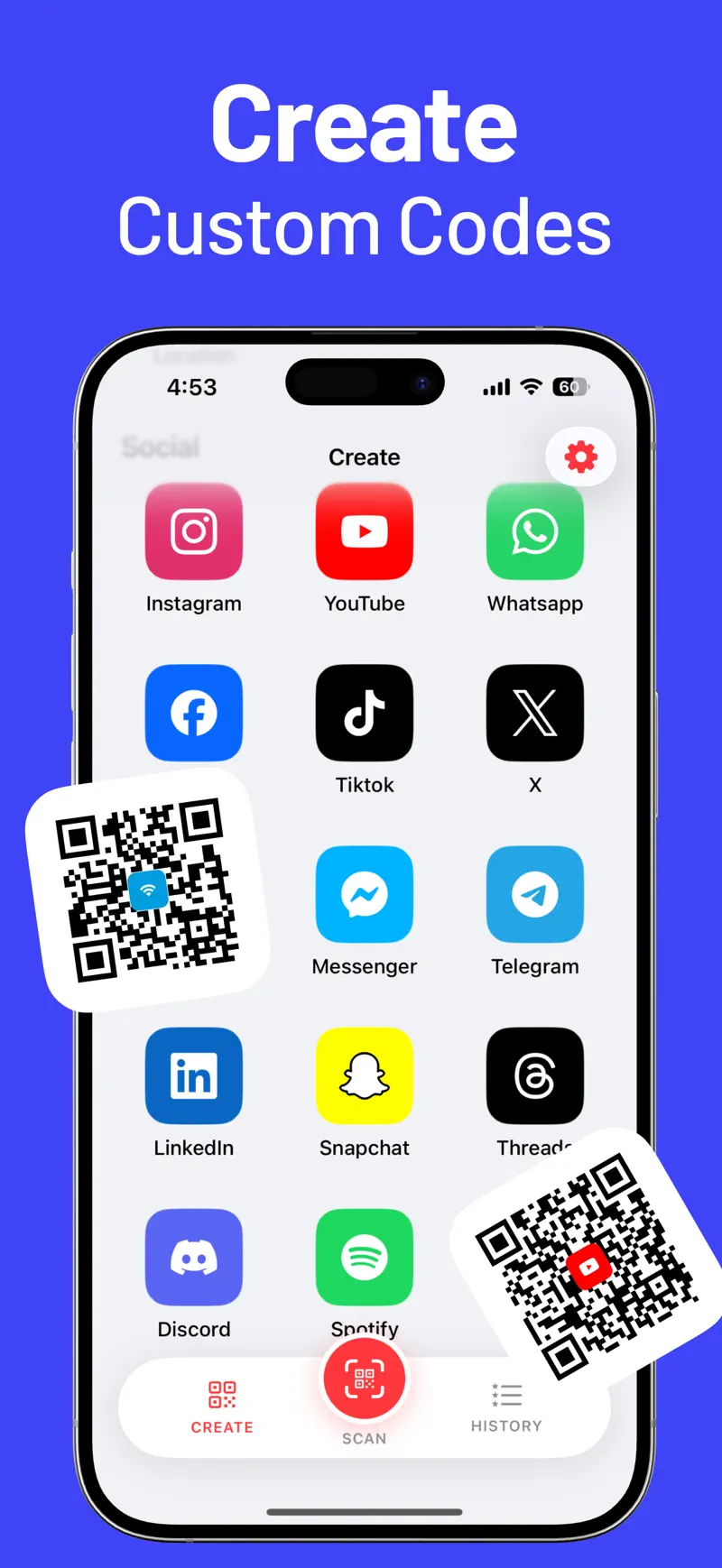
The generator is the clearest differentiator. In addition to URL, email, phone, SMS, text, Wi-Fi, and location codes, it explicitly supports profiles for Instagram, YouTube, WhatsApp, Facebook, TikTok, X, Reddit, Telegram, LinkedIn, Threads, Discord, Spotify, and other social services. You can change colors and add supported center icons.
Apple's current App Privacy section says Data Not Collected. The free app covers scanning, history, actions, and core creation; Pro unlocks every creation type and advanced scanner settings. The US storefront currently lists $1.99 weekly and $3.99 lifetime choices.
Best fit: an iPhone user who wants a simple scanner, reusable history, customizable social or Wi-Fi QR codes, and an affordable lifetime unlock.
Main tradeoff: it is iPhone-only, requires iOS 18.6, and is much newer than the established apps below.
2. QR Pro - QR Code Scanner — best completely free privacy-first app
QR Pro - QR Code Scanner is the value standout. Its listing describes the app as free, ad-free, subscription-free, and tracking-free. Apple's privacy section says Data Not Collected.
It scans QR codes and common formats such as Aztec, Data Matrix, PDF417, UPC, EAN, ITF, Code 39, Code 93, and Code 128 from the camera, Photos, image files, or drag and drop. It previews decoded contents before opening a link or action. The generator covers URLs, text, Wi-Fi, email, phone, messages, contacts, calendar events, and locations, with image, PDF, SVG, print, and share options where supported.
Optional iCloud sync keeps its library available across supported iPhone, iPad, Mac, Apple Vision Pro, and Apple Watch devices.
Best fit: someone who wants a capable scanner, generator, and library across Apple devices without ads or a paid upgrade.
Main tradeoff: its generator emphasizes common data types rather than the long named list of social-profile templates and repeated-scan controls in our first pick.
3. Code Reader - QR Scanner — best for link warnings and batch files
Code Reader - QR Scanner combines a lightweight scanner with stronger published link controls. The standard app can scan camera input and images, create QR and 1D barcodes, keep searchable recents, scan multiple codes in one session, and prefer HTTPS over insecure websites.
Pro adds warnings for suspicious URLs, including IP-address links, punycode, mixed scripts, and checks using an online threat database. It also adds batch scanning from photos or PDFs, CSV or JSON history transfer, labels, stars, notes, logo creation, and high-resolution or PDF export. Those features make it a better fit for reviewing many received codes than a design-first QR generator.
Apple's privacy section says Data Not Collected. The current US listing offers monthly, yearly, and $2.99 lifetime Pro choices and supports iPhone, iPad, and Mac.
Best fit: users who scan unfamiliar links, need batch extraction from existing files, or want portable scan history.
Main tradeoff: link warnings reduce risk but cannot guarantee that a page is legitimate; the threat check also requires an online lookup.
4. QR Code & Barcode Scanner ・ — best for inventory and CSV history
QR Code & Barcode Scanner ・ is identified as QRbot in its App Store description. It supports a broad list that includes QR, EAN, UPC, Code 128, Data Matrix, PDF417, Aztec, Code 39, Code 93, Codabar, and DataBar.
The useful difference is what it does with accumulated scans. QRbot offers unlimited history, iCloud synchronization, Spotlight search, and CSV export for Excel, Numbers, or cloud storage. Its Business Scanner Mode can send codes to a configured web server, while product codes can be searched through services such as Amazon, eBay, Google, or a custom website.
It also creates and shares common QR types and can display favorite codes on Apple Watch. The current App Privacy label says identifiers and usage data may be used for tracking, which is worth comparing with the Data Not Collected labels on our first three picks.
Best fit: small-business inventory, quality checks, or field work that needs searchable history and CSV output.
Main tradeoff: the listing includes advertising-related tracking disclosures, and its displayed version history is older than several competitors in this guide.
5. QR Code Reader & Code Scanner — best for products and advanced campaigns
QR Code Reader & Code Scanner by ShopSavvy has expanded far beyond a basic reader. It scans camera, photo-library, clipboard, and shared images; searches and filters history; supports labels, notes, stars, widgets, Siri Shortcuts, Spotlight, Apple Watch, printing, and CSV, JSON, or PDF history export.
Product barcodes can open ShopSavvy price comparisons, price history, deals, and reviews. Pro goes further with rapid scanning, bulk creation, QR design templates, dynamic destination links, scan analytics, folders, backup and restore, label sheets, and promotional layouts.
This is the most feature-dense app here for a marketer or retailer. That breadth can also be unnecessary for someone who only wants to scan and save a few codes.
Best fit: product research, retail workflows, bulk QR creation, or campaigns that genuinely require a changeable destination and scan analytics.
Main tradeoff: dynamic QR codes and analytics depend on an ongoing service rather than only encoding static data in the image. Review the current Pro terms and data flow before printing a campaign that depends on them.
6. QR Reader for iPhone — best multipurpose scanner
QR Reader for iPhone by TapMedia combines QR and barcode reading with PDF document scanning, business-card capture, puzzles, database/API scanning, product search, NFC reading on compatible devices, QR creation, and CSV export.
Its listing also says users can approve websites before visiting them. Generated QR codes can be exported as PNG or SVG, which is useful when a code is going into a document or design tool.
The app has by far the largest US rating count in this comparison, but rating volume did not determine its rank. Its broader scanner bundle and purchase model are less focused than the first picks for someone who only wants QR history and creation.
Best fit: an iPhone user who wants QR, barcode, PDF, business-card, database, and NFC tools in one established app.
Main tradeoff: the App Privacy label says identifiers may be used for tracking, and the storefront lists both a monthly TapMedia Pro bundle and a one-time QR Reader Pro purchase. Confirm which upgrade contains the exact feature you need.
7. QRectly — Scan QR & Barcodes — best for GS1 and professional codes
QRectly — Scan QR & Barcodes is the specialist pick. It reads Micro QR, rectangular Micro QR, GS1 DataMatrix, GS1 DataBar, HIBC healthcare codes, PDF417 IDs, and boarding-pass data in addition to common QR and retail formats.
The listing says it can decode fields such as GTIN, lot or batch, expiry date, serial number, and UDI. Quick Mode supports higher-volume scanning, while notes, status labels, and one-tap CSV export make results more useful in logistics, manufacturing, travel, or healthcare workflows. It operates offline, has no ads, and Apple's privacy section says Data Not Collected.
Best fit: teams that know they need GS1, HIBC, AAMVA ID, boarding-pass, Micro QR, or rMQR support.
Main tradeoff: the current release requires iOS 26.0. For normal web links, menus, and personal QR creation, this specialist is more tool than most people need.
Which QR scanner should you choose?
Choose by the task you will repeat, not by the longest feature list.
| Your priority | Best choice |
|---|---|
| Scanner, searchable history, social QR creation, and a low-cost lifetime option | QR Reader & Creator |
| Completely free, ad-free use across Apple devices | QR Pro - QR Code Scanner |
| Suspicious-link warnings and batch scanning from photos or PDFs | Code Reader - QR Scanner |
| Inventory scanning, iCloud history, and CSV export | QR Code & Barcode Scanner ・ (QRbot) |
| Product price lookup, dynamic QR codes, and campaign analytics | QR Code Reader & Code Scanner |
| QR, document, business-card, database, and NFC scanning in one app | QR Reader for iPhone |
| GS1, HIBC, healthcare, logistics, ID, or boarding-pass formats | QRectly — Scan QR & Barcodes |
| One occasional web QR code | Apple's Camera or Code Scanner |
Install the free option first and test it with the actual codes in your workflow. A retail UPC, event QR, PDF417 ticket, GS1 DataMatrix label, and Wi-Fi QR are not interchangeable test cases.
How to scan QR codes more safely
A QR image can hide its destination until it is decoded. The FBI advises against scanning QR codes from unknown sources and recommends caution before granting permissions or opening websites and apps.
Use this short check every time the source is unfamiliar:
- Inspect the physical code for a sticker placed over the original, especially on parking meters, payment terminals, and public signs.
- Read the displayed domain before opening it. Watch for misspellings, unfamiliar subdomains, raw IP addresses, and look-alike characters.
- Do not enter a password, payment card, recovery phrase, or one-time code merely because the page opened from a QR scan.
- Confirm unexpected payment, delivery, account, or package instructions through the organization's official app or a website you type yourself.
- Grant only the permissions needed for the feature. A basic camera scan should not require Contacts or location access.
- Delete sensitive scan history or exported files when the work is complete.
Link previews and threat databases are useful layers, not guarantees. A newly created phishing site may not yet be on a blocklist, and a legitimate domain can still host misleading content.
Frequently asked questions
What is the best QR code scanner app for iPhone in 2026?
Our first-party overall pick is QR Reader & Creator for users who want scanning, searchable history, quick result actions, customizable social QR codes, and an affordable lifetime Pro option in one focused iPhone app. QR Pro is the better choice if a completely free, ad-free app across several Apple devices is the priority.
Does iPhone have a built-in QR code scanner?
Yes. Apple's Camera app and the Code Scanner control can open ordinary QR links without another download. Install a dedicated app for history, barcode formats, saved-image scanning, export, repeated scans, link warnings, or QR creation.
What is the best free QR scanner for iPhone?
For occasional QR links, use the built-in Camera. Among dedicated apps in this list, QR Pro is the clearest fully free option because its listing says there are no ads or subscriptions. QR Reader & Creator is free for scanning and core workflows, with advanced creation and scanner settings in Pro.
Can an iPhone scan a QR code from a screenshot?
Yes. iOS can recognize many codes in Photos, and several dedicated apps explicitly accept images. QR Pro can scan from Photos or image files, Code Reader provides a Read Code extension and batch photo or PDF scanning, and ShopSavvy's reader accepts photo-library, clipboard, and shared images.
Can a QR scanner tell whether a link is safe?
Some apps preview the decoded address or warn about suspicious patterns, and Code Reader Pro publishes checks using an online threat database. No scanner can guarantee that every destination is harmless. Verify the domain and be especially cautious when a scanned page requests a login or payment.
What is the difference between a QR code and a barcode?
A traditional one-dimensional barcode stores data across lines and is common on products. A QR code is two-dimensional and can hold more varied data such as a URL, Wi-Fi credentials, contact card, location, or plain text. Check the exact format list when scanning PDF417, Data Matrix, GS1, or industry labels.
Do generated QR codes expire?
A static QR code that directly contains a URL, Wi-Fi network, contact, or text does not expire by itself. It stops being useful if the encoded destination changes. Dynamic QR services can redirect to a new destination, but their continued operation may depend on the provider and plan.
Our 2026 recommendation
For most iPhone users who have outgrown Camera, QR Reader & Creator is our #1 QR scanner app. It keeps frequent scanning, searchable history, useful result actions, broad barcode support, and personalized QR creation together without turning the everyday interface into a business dashboard.
Start with real samples, confirm the result screen and history behave as expected, and print-test every QR code before distributing it. Review the current QR Reader & Creator features and official screenshots, read the complete iPhone QR scanning guide, or download QR Reader & Creator from the US App Store.
Get QR Reader & Creator
Compare the 7 best QR code scanner apps for iPhone in 2026 by scanning, history, QR creation, privacy, link controls, barcode support, and price.
5.0 · 2


 Unit Converter Max